2012年

SmartMarkdown插件bug

bug描述

SmartMarkdown是Sublime Text2的一个插件,该插件提供了smart table的功能,该功能在只有ascii字符的时候很完美,但当内容中出现中文,中文标点的时候就会产生错位,这是因为中文在屏幕上的显示占了两倍的英文所占有的位置。

bug修复

由于该插件里面计算的时候是按照字符的长度来计算的,所以他把中文字符串的长度也是计算为1的。我们要做的就是把非ascii字符串替换为两个占位字符,然后计算长度。找到插件目录下的table.py

# 21行添加
NONE_ASCII_PATTERN = re.compile(r'[^\x00-\xff]')
# 124行修改为
new_row.append(col + " " * (cols_length[i] - len(NONE_ASCII_PATTERN.sub('  ',col))))
# 163行修改为
col_len = len(NONE_ASCII_PATTERN.sub('  ', col))

修改过的文件:下载
CentOS一些配置及系统信息文件

大概三个月前,在公司做了个系统管理的程序(时间设置,网卡设置,系统时间设置,等等),现在记录下这些文件的路径,备忘。

# 网络默认参数
/etc/sysconfig/network

# dns
/etc/resolv.conf

# 单个网卡
/etc/sysconfig/network-scripts/ifcfg-eth*

# 登录系统时的提示信息
/etc/issue

# 登陆后的提示信息
/etc/motd

# 系统版本
/etc/redhat-release

# 时区
/etc/localtime
/usr/share/zoneinfo/*

/etc/sysconfig/clock

利用百度地图API拆分纯真IP数据库地址

导出txt,并转码

利用安装后的ip.exe导出txt文件,由于python处理gbk中文的时候会有些问题,所以我们直接选个编辑器打开之后,再以utf-8的编码保存就可以了。

提取所有地址

由于我们需要通过百度地图的API一个地址一个地址的查询,所以去除重复的地址可以减少我们的查询量。

# coding: utf-8
# python的去重方法很多,这里我们选用set类型
with open('ipdata.txt', 'r', encoding='utf-8') as handle:
    regex = re.compile(' +')
    addrs = set([])
    for line in handle:
        if line.strip() != '':
            address = regex.split(line.strip())[2]
            addrs.add(address)
    # addrs 就是我们过滤之后的所有地址了

上面我们已经过滤出所有的地址了,接下来就是使用百度的API来拆解这些地址。

import re, urllib, time, json
from urllib import parse, request

with open('ipdata.txt', 'r', encoding='utf-8') as handle:
    regex = re.compile(' +')
    addrs = set([])
    for line in handle:
        if line.strip() != '':
            address = regex.split(line.strip())[2]
            addrs.add(address)

    url = 'http://api.map.baidu.com/geocoder?output=json&key=你的API key'

    wh = open('address/list.txt', 'w', encoding="utf-8")
    for addr in addrs:
        addr_x = ''
        url_x = url + '&address=' + parse.quote(addr)
        # time.sleep(3)
        req = request.urlopen(url_x)
        res = req.read().decode()

        data = json.loads(res)

        if data['result']:
            location = str(data['result']['location']['lat']) + ', ' + str(data['result']['location']['lng'])
            url_x = url + '&location=' + parse.quote(location)

            req = request.urlopen(url_x)
            res = req.read().decode()

            data = json.loads(res)
            if data['result']:
                component = data['result']['addressComponent']
                addr_x = component['province'] + ' ' + component['city'] + ' ' + component['district']
        wh.write(addr + '\t' + addr_x + '\n')
    wh.close()

未完待续...

wxpython练手

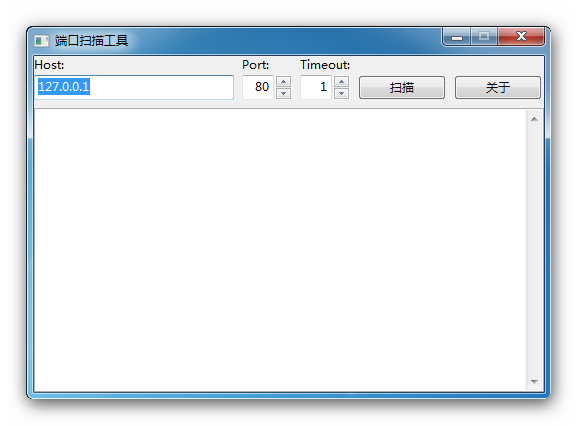
学习wxpython的练手软件,写的比较简单,名为扫描,实际上每次只能扫描一个端口。

PS:py2exe打包的程序伤不起啊,小小的一个程序,依赖库什么放进去竟有20多M。
setup里面设置的icon_resources居然没成功,不知道是不是哪儿写错了。

源码:下载

使用Stylus来写css

less sass stylus都可以用来简化css的书写,我选用stylus主要有以下几点原因:

  • Stylus is "pythonic"
  • stylus的语法看上去更像一门编程语言

其中有一点蛋疼的是,哥没找到怎么设置输出css的缩进字符,个人还是比较喜欢用tab缩进。安装完nodejs后安装stylus和nib

npm install stylus nib

Windows7的都安装到C:\Users\用户名\node_modules\stylus目录下了,使用nib的时候,要

stylus --include C:\\Users\\用户名\\node_modules\\stylus test.styl

nib库中定义好了很多常用的css,可以直接调用,方便很多。

python http server

前端调试的时候,有的时候需要网络环境,哥对bat不懂,自己就瞎凑了个代码出来,以下代码需要python3.x的支持。

@echo off
set port=8080
if not ""%1"" equ """" set port=%1
python -m http.server %port% | explorer http://localhost:%port%
@echo on

Supervisor安装及配置

Supervisor安装

# 安装
easy_install supervisor
# 生成默认配置文件
echo_supervisord_conf > /etc/supervisord.conf
mkdir /etc/supervisord.conf.d

修改配置文件

include区段修改为

[include]
files = /etc/supervisord.conf.d/*.conf

如需要访问web控制界面,inet_http_server区段修改为

[inet_http_server]
port=0.0.0.0:9001
username=username ; 你的用户名
password=password ; 你的密码

每个需要管理的进程分别写在一个文件里面,放在/etc/supervisord.conf.d/目录下,便于管理。例如:test.conf

[program:sqlparse]
directory = /var/www/python
command = /bin/env python test.py

将supervisord加入系统服务,以下代码来自gist,文件:/etc/init.d/supervisord

#!/bin/sh
#
# /etc/rc.d/init.d/supervisord
#
# Supervisor is a client/server system that
# allows its users to monitor and control a
# number of processes on UNIX-like operating
# systems.
#
# chkconfig: - 64 36
# description: Supervisor Server
# processname: supervisord

# Source init functions
. /etc/init.d/functions

RETVAL=0
prog="supervisord"
pidfile="/tmp/supervisord.pid"
lockfile="/var/lock/subsys/supervisord"

start()
{
        echo -n $"Starting $prog: "
        daemon --pidfile $pidfile supervisord -c /etc/supervisord.conf
        RETVAL=$?
        echo
        [ $RETVAL -eq 0 ] && touch ${lockfile}
}

stop()
{
        echo -n $"Shutting down $prog: "
        killproc -p ${pidfile} /usr/bin/supervisord
        RETVAL=$?
        echo
        if [ $RETVAL -eq 0 ] ; then
                rm -f ${lockfile} ${pidfile}
        fi
}

case "$1" in

  start)
    start
  ;;

  stop)
    stop
  ;;

  status)
        status $prog
  ;;

  restart)
    stop
    start
  ;;

  *)
    echo "Usage: $0 {start|stop|restart|status}"
  ;;

esac
chmod +x /etc/init.d/supervisord
chkconfig supervisord on
service supervisord start

oracle UTL_FILE包操作文件

利用UTL_FILE导出数据

-- 定义fhandle文件句柄
fhandle utl_file.file_type;
-- 打开文件
fhandle := utl_file.fopen(location => './', filename => 'export_' || to_char(sysdate, 'yyMMddHH24mi') || '.txt', open_mode => 'w', max_linesize => 32767);
-- 写入一行数据
utl_file.put_line(file => fhandle, buffer => 'test str');
-- 关闭句柄
utl_file.fclose(file => fhandle);

python中的那些else

python与其他语言不同的是,else不仅可以和if搭配,它还可以跟其他的逻辑语句一起使用;if/else这里就不在记录。

while/else for/else

# 只有当循环正常执行完的时候,才会执行else中的语句,如果循环语句被break的时候,将不会执行else中的语句
for i in range(1, 11):
	if i == 8:
		break
	print(i, end = ',')
else:
	print(11)
# 1,2,3,4,5,6,7,

for i in range(1, 11):
	print(i, end = ',')
else:
	print(11)
# 1,2,3,4,5,6,7,8,9,10,11

try/except/else/finally

try:
	raise(RuntimeError, 'force issue')
except:
	# 抛出错误时执行
	print(1)
else:
	# 在不抛出错误的情况下执行
	print(2)
finally:
	# 不管有没有抛出错误都执行
	print(3)

java调用Jalopy

关于jalopy的资料,我在他的官网上也没发现多少,于是自己看着他的那个主文件,写了个简单的调用出来。

import de.hunsicker.jalopy.Jalopy;

public class Call {
	public static String format(String code) {
		Jalopy codeFormatter = new Jalopy();
		String path = "input.java";
		StringBuffer output = new StringBuffer();
		codeFormatter.setInput(code, path);
		codeFormatter.setOutput(output);
		codeFormatter.format();

		return output.toString();
	}
	public static void main(String[] args) {
		System.out.println(format("public class Test {\n"
+ "			public static void main() {\n"
+ "\n"
+ "			}\n"
+ "		}"));
	}
}

thrift的php TCompactProtocol库bug

bug描述:读取的boolean类型的值始终为false,这纠结了我半天,本来还以为是因为自己不会java,服务器端的java代码写错,于是经过严密的审查,觉得应该是php端出了问题。

# 找到333行,修改为:
$field_type &= 0x0f;
# 找到343行,在上面添加一行:
$field_type = $this->getTType($field_type);
# 搞定

编译thrift的php扩展

php的版本5.4.2

cd /usr/local/src/thrift-0.8.0/lib/php/src/ext/thrift_protocol/
phpize
./configure
make && make install

在php5.4下面上面的编译会出错,直接修改php_thrift_protocol.cpp文件的95行,将function_entry替换为zend_function_entry,然后重新编译就好了。

* warning 就先不考虑了。

以库的形式调用closure compiler

本来是用命令行的方式调用google closure compiler,可是效率不如人意;于是网上查找了些资料,实践了一下。

import com.google.javascript.jscomp.CompilationLevel;
import com.google.javascript.jscomp.Compiler;
import com.google.javascript.jscomp.CompilerOptions;
import com.google.javascript.jscomp.JSSourceFile;

public class CallCompile {
	public static String compile(String code) {
		Compiler compiler = new Compiler();
		CompilerOptions options = new CompilerOptions();
		CompilationLevel.ADVANCED_OPTIMIZATIONS.setOptionsForCompilationLevel(options);

		JSSourceFile external = JSSourceFile.fromCode("external.js", "");
		JSSourceFile primary = JSSourceFile.fromCode("primary.js", code);

		compiler.compile(external, primary, options);

		return compiler.toSource();
	}

	public static void main(String[] args) {
		System.out.println(compile("console.log('hello world.')"));
	}
}

编译执行命令


# Windows下
javac -cp ".;./compiler.jar" CallCompile.java
java -cp ".;./compiler.jar" CallCompile

# Linux下
javac -cp ".:./compiler.jar" CallCompile.java
java -cp ".:./compiler.jar" CallCompile

2014-04-07 20:18 更新

最新的closure compiler有所更新,示例代码修改成如下:

import com.google.javascript.jscomp.Compiler;
import com.google.javascript.jscomp.CompilerOptions;
import com.google.javascript.jscomp.CompilationLevel;
import com.google.javascript.jscomp.SourceFile;

// import java.util.logging.Level;

public class Test {

	public static void main(String[] args) {
		// Compiler.setLoggingLevel(Level.OFF);
		Compiler compiler = new Compiler();
		CompilerOptions options = new CompilerOptions();
		CompilationLevel.ADVANCED_OPTIMIZATIONS.setOptionsForCompilationLevel(options);
		SourceFile extern = SourceFile.fromCode("extern", "");
		SourceFile primary = SourceFile.fromCode("primary", "(function(){console.log('test')})();");
		compiler.compile(extern, primary, options);
		System.out.println(compiler.toSource());
		System.exit(0);
	}
}