2012年

C++ split的实现

#include 
#include 
#include 
#include 
#include 

using namespace std;

vector &split(const string &s, char delim, vector &elems) {
    istringstream iss(s);
    string item;
    while(getline(iss, item, delim)) {
        elems.push_back(item);
    }
    return elems;
}


vector split(const string &s, char delim) {
    vector elems;
    split(s, delim, elems);
    return elems;
}

int main() {
	vector elems = split("Hello, world!", ',');
	for(vector::iterator it = elems.begin(); it < elems.end(); it++) {
		cout << *it << endl;
	}
	return 0;
}

python杂记2

判断是否为数字

isdigit()的话,里面不能有小数点。

def is_number(s):
    try:
        n=str(float(s))
        if n == "nan" or n=="inf" or n=="-inf" : return False
    except ValueError:
        return False
    return True

切分list

def chunks(l, n):
    return [l[i: i + n] for i in range(0, len(l), n)]

字符串数字取整

直接用int会报错。

str = "545.2222"
print(int(float(str)))

合并字典

x = {'a':1, 'b': 2}
y = {'b':10, 'c': 11}

# python2.x
z = dict(x.items() + y.items())
# python3.x
z = dict(list(x.items()) + list(y.items()))

# another way
z = dict(x, **y)

os.path.join的坑

如果路径中有绝对路径,则前面的所有路径都会被抛弃

Yii语言包词条提取

据说是哥半年前写的一个用户管理程序,而现在老大要求程序能切换语言;将原来的词条用英文添进去之后,发现写语言包的时候一个一个提取比较麻烦,所以就写了个程序提取。(目前还只能提取Yii::t里面只有两个参数的情况)

<?php

$fileinfo = new FilesystemIterator('group'); // 目录

$words = array();
while($fileinfo->valid()) {
    
    if($fileinfo->getExtension() === 'php') {
        $filename = $fileinfo->getFilename();
        $fileobject = $fileinfo->openFile();

        while($fileobject->valid()) {
            if(preg_match_all('/Yii::t\(([\'"])([^\'"]*?)\\1\s*,\s*([\'"])(.*?)\\3\)/', $fileobject->current(), $matches)) {
                foreach($matches[4] as $match) {
                    $words[$match] = isset($words[$match]) ? $words[$match] . '; ' . $filename . ' # ' . $fileobject->key() : '// ' . $filename . ' # ' . $fileobject->key();
                }
            }
            $fileobject->next();
        }
    }

    $fileinfo->next();
}


function save_to_file($content = '') {
    $fileobject = new SplFileObject('user.trans.php', 'w');
    $fileobject->fwrite($content);
}

ob_start('save_to_file');

echo '<?php
/**
 * @author XiaoZi<245565986@qq.com>
 */
return array(
';

foreach($words as $word => $comment) {
    echo "\t" . $comment . PHP_EOL;
    echo "\t" . '\'' . $word . '\' => \'\',' . PHP_EOL;
}

echo ');
';

ob_end_clean();

InnoSetup杂记

那些个控件名

// 输出所有控件名
procedure InitializeWizard;
var
	i: integer;
	te: TMemo;
begin
	te := TMemo.Create(WizardForm);
	te.Parent := WizardForm.WelcomeLabel2;

	with WizardForm do
	begin
		for i:= ComponentCount - 1 downto 0 do
		begin
			if Components[i].Name <> '' then
			begin
				te.Text := te.Text + Components[i].Name + #13 + #10;
			end;
		end;
	end;
end;
BeveledLabel
FinishedHeadingLabel
FinishedLabel
YesRadio
NoRadio
RunList
WizardBitmapImage2
FinishedPage
PageNameLabel
PageDescriptionLabel
WizardSmallBitmapImage
MainPanel
InfoAfterClickLabel
InfoAfterMemo
InfoAfterPage
ProgressGauge
StatusLabel
FilenameLabel
InstallingPage
PreparingNoRadio
PreparingYesRadio
PreparingLabel
PreparingErrorBitmapImage
PreparingPage
ReadyLabel
ReadyMemo
ReadyPage
SelectTasksLabel
TasksList
SelectTasksPage
SelectStartMenuFolderLabel
SelectStartMenuFolderBrowseLabel
GroupEdit
GroupBrowseButton
NoIconsCheck
SelectGroupBitmapImage
SelectProgramGroupPage
SelectComponentsLabel
TypesCombo
ComponentsList
ComponentsDiskSpaceLabel
SelectComponentsPage
SelectDirLabel
SelectDirBrowseLabel
DirEdit
DirBrowseButton
DiskSpaceLabel
SelectDirBitmapImage
SelectDirPage
UserInfoNameLabel
UserInfoNameEdit
UserInfoOrgLabel
UserInfoOrgEdit
UserInfoSerialLabel
UserInfoSerialEdit
UserInfoPage
InfoBeforeClickLabel
InfoBeforeMemo
InfoBeforePage
PasswordLabel
PasswordEditLabel
PasswordEdit
PasswordPage
LicenseLabel1
LicenseMemo
LicenseAcceptedRadio
LicenseNotAcceptedRadio
LicensePage
InnerNotebook
Bevel1
InnerPage
WelcomeLabel1
WelcomeLabel2
WizardBitmapImage
WelcomePage
OuterNotebook
BackButton
NextButton
CancelButton
Bevel

注册表

开机启动
HKEY_CURRENT_USER\Software\Microsoft\Windows\CurrentVersion\Run
文件右键使用my software打开
HKEY_CLASSES_ROOT\*\Shell\Open with My Software\command

例子来自Sublime Text 2的安装包

[Registry]
Root: HKCR; Subkey: "*\Shell\Open with Sublime Text 2\command"; ValueType: String; ValueData: "{app}\sublime_text.exe ""%1"""; Tasks: "contextentry"; MinVersion: 0.0,5.0; Flags: uninsdeletekey 
Root: HKCR; Subkey: "*\Shell\Open with Sublime Text 2"; Tasks: "contextentry"; MinVersion: 0.0,5.0; Flags: uninsdeletekey dontcreatekey
[Tasks]
Name: "contextentry"; Description: "Add to explorer context menu"; MinVersion: 0.0,5.0; 

编译安装gcc-4.7.1

cd /usr/local/src/
wget http://ftp.gnu.org/gnu/gcc/gcc-4.7.1/gcc-4.7.1.tar.gz
tar zxf gcc-4.7.1.tar.gz
cd gcc-4.7.1
./contrib/download_prerequisites
./configure --prefix=/usr/local/gcc
make && make install
# 介个编译时间有点长,得慢慢等...

C++读取配置文件

配置文件格式

 # nimei
host = 127.0.0.1
 port = 80

	key
	=123
mask = 255.255.255.0
# comment

C++代码

/**
 * @author xiaozi<245565986@qq.com>
 */
#include 
#include 
#include 
#include 

using namespace std;

string trim(const string& str);

int main(int agrc, char* argv[]) {
	const char* filename = "parse.conf";
	ifstream ifs(filename);

	string line = "";
	string key = "";
	string value = "";
	string::size_type pos = string::npos;

	map options;

	while(! ifs.eof()) {
		getline(ifs, line);

		line = trim(line);
		// 空行 和 注释行 和 不存在等号的行,跳过
		if(line.empty() || line.at(0) == '#') {
			continue;
		}

		if((pos = line.find('=')) == string::npos) {
			// cout << "语法错误" << endl;
			continue;
		}

		key = trim(line.substr(0, pos));
		value = trim(line.substr(pos + 1, line.size() - pos - 1));

		// key不为空的时候,留下该行数据
		if(! key.empty()) {
			options[key] = value;
		}
	}

	ifs.close();

	// 输出得到的数据
	map::iterator it;
	for(it = options.begin(); it != options.end(); it++) {
		cout << (*it).first << " => " << (*it).second << endl;
	}

	return 0;
}

string trim(const string& str) {
	if(str.empty()) {
		return str;
	}
	string::size_type pos = str.find_first_not_of(" \t\n\r\0\x0B");
	if(pos == string::npos) {
		return str;
	}
	string::size_type pos2 = str.find_last_not_of(" \t\n\r\0\x0B");
	return str.substr(pos, pos2 - pos + 1);
}

Centos硬盘读写速度测试

老看到網上有在前面加time的,而且還用兩個數字除一下,於是我就覺得蛋疼,你說明明顯示出了結果,爲什麼還要自己再算一邊呢?後來才知道是linux4下是不會有速度結果出來的,於是你知道的,”轉載就轉載了,尼瑪動過腦子沒?還把有結果的貼在文章裏面,自己甩自己嘴巴啊。“

PS:最近喜歡上繁體字了,木有辦法啊!

# 測試寫文件的速度:
sync;dd if=/dev/zero of=/tmp/1GB.file bs=1024 count=1000000
# 測試讀文件的速度:
sync;dd if=/tmp/1GB.file of=/dev/null bs=1024 count=1000000


# 測試10次寫文件的速度(有無執行sync的區別比較大):
for i in {1..10}
do
sync
dd if=/dev/zero of=/tmp/1GB.file bs=1024 count=1000000
done

# 測試10次讀文件的速度(有無執行sync沒多大的區別):
for i in {1..10}
do
sync
dd if=/tmp/1GB.file of=/dev/null bs=1024 count=1000000
done


# 由於dd命令結果是顯示在錯誤輸出的上的,若需要進一步處理數據,則需要將結果重定向:
sync;dd if=/dev/zero of=/tmp/1GB.file bs=1024 count=1000000 2>&1 | grep "copied"
sync;dd if=/tmp/1GB.file of=/dev/null bs=1024 count=1000000 2>&1 | grep "copied"

C++中嵌入python

#include 
#include 

using namespace std;

int main(int argc, char* argv[]) {
	PyObject *pModule, *pDict, *pFunc;
	PyObject *pArgs, *pArg, *pResult;
	
	Py_Initialize();
	// ...
	PyRun_SimpleString("import sys");
	PyRun_SimpleString("sys.path.append('./')");
	
	// ...
	pModule = PyImport_ImportModule("callback");

	if(pModule != NULL) {
		pDict = PyModule_GetDict(pModule);
		pFunc = PyDict_GetItemString(pDict, "hello");

		if(pFunc && PyCallable_Check(pFunc)) {
			pResult = PyObject_CallObject(pFunc, NULL);
			if(pResult != NULL) {
				cout << PyString_AsString(pResult) << endl;

				Py_DECREF(pResult);
			}
			
		}
		Py_XDECREF(pFunc);
		Py_DECREF(pDict);
		Py_DECREF(pModule);
	}

	// Py_DECREF(pArgs);
	// Py_DECREF(pArg);
	
	Py_Finalize();
	
	return 0;
}

內容粗略,僅是記錄一下,有待更新。

bash杂记2

不显示终端的输入(stty)

echo "Please enter your password:"
stty -echo
read PASSWORD
stty echo
# 输出刚才输入的内容
echo $PASSWORD

交互式选择(select)

# 江山和美人,你更喜欢那个?
echo "Which do you prefer?"
select result in "beauty" "land"
do
	break
done
echo $result

得到当前脚本的绝对路径

echo $(cd "$(dirname "$0")"; pwd)

mysql储存时间选择怎样的字段类型

储存时间,常用的有三个选择datetimetimestampint。昨夜同事问到了,于是今天就总结一下自己的理解。

  1. 插入效率:datetime > timestamp > int
  2. 读取效率:int > timestamp > datetime
  3. 储存空间:datetime > timestamp = int
具体上面的实验数据可以看这篇文章
建立索引的体积,和索引的速度,你懂的。

让我们来看一个应用场景:
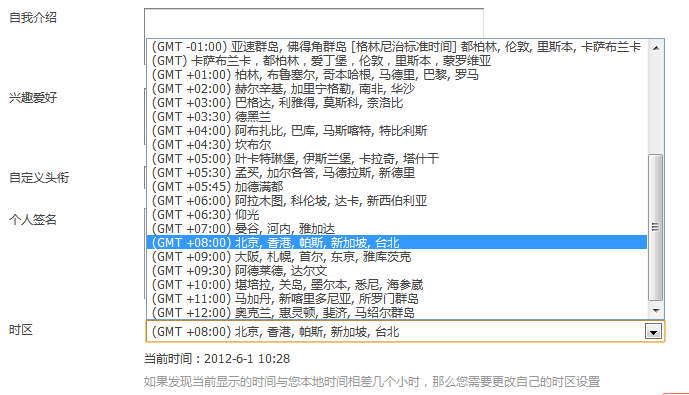
QQ截图20120601102859.png
看下这张图,第一我们需要设置系统的默认时区,第二我们也需要提供不同时区时间显示的需要。于是,我们分别使用datetimetimestampint字段类型来看下:

使用datetime

直接显示时间,这是个不错的选择,但是如果考虑到时区,很明显计算上的麻烦。

使用timestamp

OK,这个很好,可以根据系统的时区来自动输出时间,但是单个用户要定制自己的时区呢?再者你不怕麻烦,在程序里面实现了这个计算,服务器若是换个地方,改了下时区,你程序里面计算单个用户当地时间的代码怎么办(timestamp出来的时间会根据时区的变化而变化,在某些情况下是不错的选择,但在某些情况下,真的很鸡肋)。

使用int

从上面两个类型的缺点看来,貌似这个类型可以解决以上的问题,其实我们只要存格林时间的unix timestamp就好了,时区时间的计算上也很方便,读取的效率也不错。我觉得用这个储存的缺点呢,就是直接select的时候时间不能直观的显示出来。

看看其他开源程序是怎么做的

discuz, typecho, emlog等等等等,他们都选用int了,这一定有他们的道理,我想也没什么可以多说的了。

C++获取程序所在目录

#include 
#include 
#include 

using namespace std;

string selfPath();

int main() {
	string abspath = selfPath();
	cout << abspath << endl;
	return 0;
}

string selfPath() {
	char buff[1024];
	ssize_t len = readlink("/proc/self/exe", buff, sizeof(buff)-1);
	if(len != -1) {
		buff[len] = '\0';
		return dirname(buff);
	}
	return "";
}

C++ console显示进度条

#include 
#include 

using namespace std;

int main() {
	for(int i = 0; i <=10; i++) {
		// flush擦除,\r定位到行首
		cout << flush << '\r' << string(i, '#');

		sleep(1);
	}
	cout << endl;

	cin.get();
	return 0;
}

C# Clipboard的操作

Clipboard.ContainsText(); // 判断剪切板中是否包含文字
Clipboard.GetText(); // 获取剪切板文字
Clipboard.SetText(); // 设置剪切板文字

Clipboard.ContainsImage(); // 判断剪切板中是否包含图片
Clipboard.GetImage();
Clipboard.SetImage();

// 还有其他的,比如声音文件...

Clipboard.Clear(); // 清空剪切板

《编程珠玑》学习笔记

书是买了好久,一直没心情,到今天才拿起来看,算法使用python实现。

位图排序

import random
# 产生一组随机数
unsorted = [random.randint(1, 19) for i in range(7)]

print(unsorted)
# 初始化一个向量组
bits = [0] * 20
# 储存排序后的结果
hsorted = []
# 对号入座
for i in unsorted:
	bits[i] = 1
for n, m in enumerate(bits):
	if m == 1:
		hsorted.append(n)

print(hsorted)

二分法查找

lis = [0,1,2,3,4,5,6,7,8]

search = 7.5

def binarySearch(lis, search):
	low = 0
	high = len(lis) - 1
	while low <= high:
		#mid = (low + high) // 2
		mid = (low + high) >> 1
		if search < lis[mid]:
			high = mid - 1
		elif search > lis[mid]:
			low = mid + 1
		elif search == lis[mid]:
			return mid
	if low > len(lis) - 1 or high < 0:
		return -1
	return (high, low)

print(binarySearch(lis, search))